
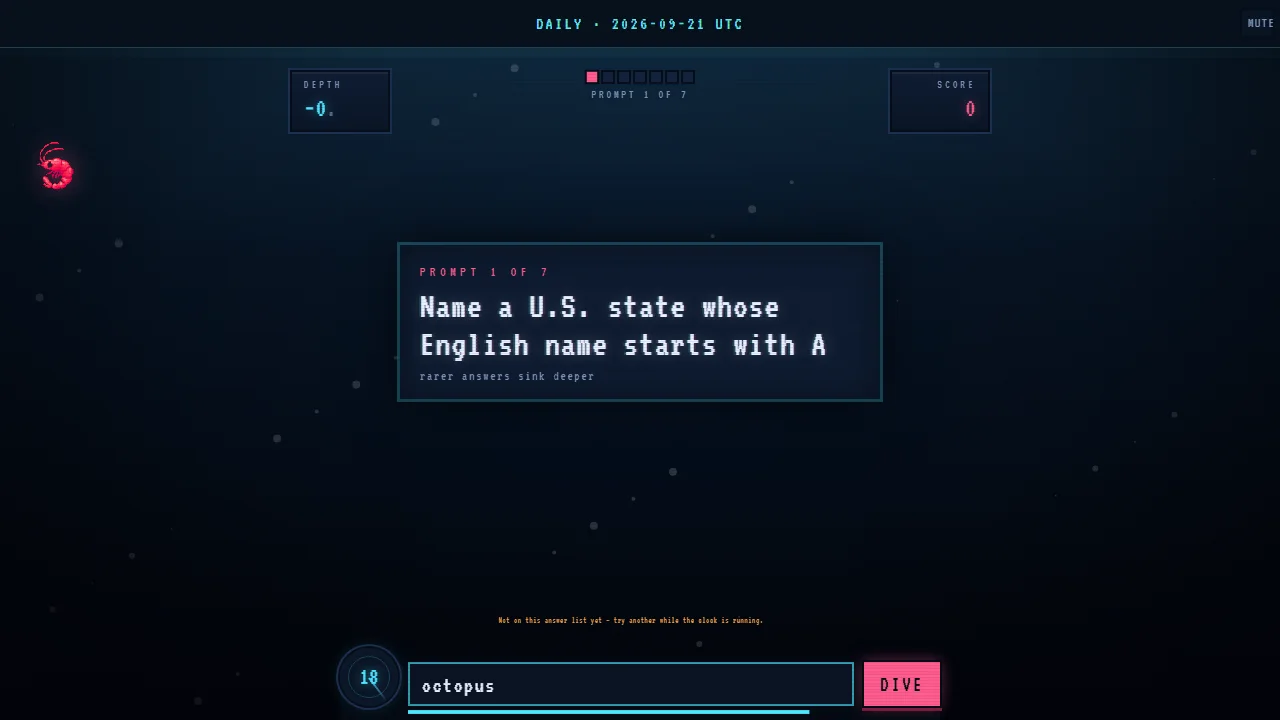
Krillion troubleshooting: identify the visible symptom
Start with the last thing that worked. The surrounding guide can load while the external game has not been created. The game can appear while the answer field lacks focus. Text can enter correctly and still be rejected by the answer list. Those are three different systems, so refreshing at the first sign of trouble often destroys useful evidence without fixing the cause.
| Visible state | Working layer | Likely fault | First safe action |
|---|---|---|---|
| Cover and Play Now | Guide page | The player has not been launched | Press Play Now once |
| Loading status | Launcher | The external host is connecting | Wait for success or the explicit timeout |
| Blank area or retry message | Page shell | Host, filtering, or network response | Use Retry once |
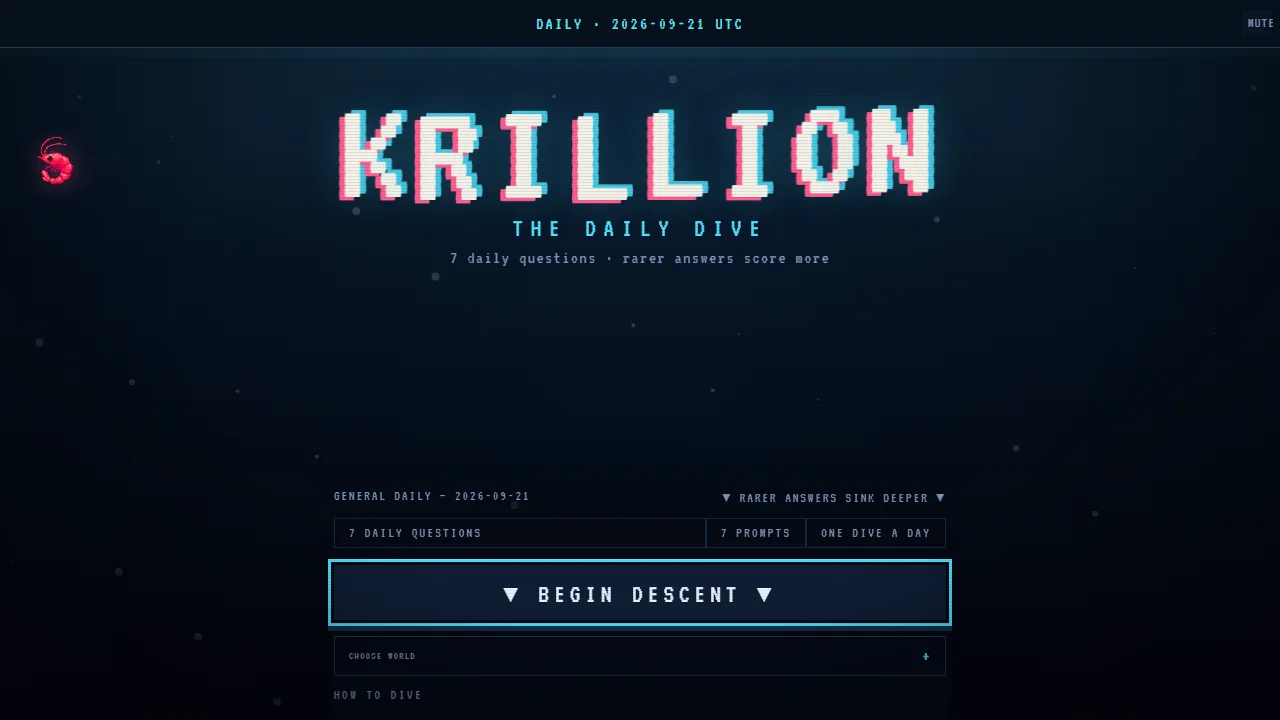
| Krillion title screen | Game and network | No fault yet | Prepare view, then Begin Descent |
| Prompt visible; keys do nothing | Game rendering | Focus is outside the answer field | Tap the field directly |
| Text visible; answer rejected | Input and connection | Validation or category mismatch | Use another legal answer |
| Controls cropped | Game loaded | Zoom, orientation, or keyboard obstruction | Exit fullscreen, reset view, then resize |
Preserve the clue before changing anything
Read the status text, note whether the timer moves, and check whether typing appears. A moving timer proves the game loop is active. A visible rejection proves the submit action reached the validator. A blank player with the rest of the page responsive points toward the embedded host or a filter, not the entire site. This thirty-second diagnosis prevents a long list of unrelated fixes.
Nothing appears before Play Now
Before Play Now, the absence of an iframe is intentional. The launcher uses a cover and button so the external game does not connect until a player asks for it. If the cover, title, and Play Now control are present, the page is ready. Press once and wait. Double-clicking does not create a faster connection and should never create two players.
Know which button belongs to which layer
| Control | Where it appears | What it changes |
|---|---|---|
| Play Now | Site launcher | Creates the single Krillion iframe |
| Retry | Site failure state | Starts a fresh load attempt after an error or timeout |
| Begin Descent | Inside Krillion | Starts or resumes the timed seven-prompt run |
| Webpage Fullscreen | Site player bar | Enlarges the player without changing game state |
| Browser Fullscreen | Browser or player control | Hides browser chrome; it does not reload the game |
If Play Now itself is missing, check whether the page finished loading and whether text or images elsewhere are also absent. A site-wide partial render is different from a game-host problem. One normal page refresh is reasonable before a Daily Dive has begun. Once a timed run is visible, avoid refreshing unless preserving that attempt is no longer possible.
Fix a blank, slow, or stalled Krillion player
After Play Now, allow the visible loading attempt to reach a result. The launcher has a finite timeout and should either show the game or expose a retryable failure. While it is waiting, repeated clicks add noise: we can no longer tell whether the original request was slow or whether later actions changed the state.
- Wait for the loading message to settle into the title screen or an explicit unavailable state.
- Choose Retry once. Then give that new attempt the same uninterrupted window.
- Open an ordinary page in the same browser to check whether the connection is generally alive.
- If possible, compare the same page on another trusted network. A school, office, DNS filter, or regional route can affect only the game host.
- Try one current mainstream browser with normal settings. A difference between browsers is useful evidence, not a reason to disable every protection.
- If the host remains unavailable, stop. The written guides and other games can still work while an external service is down.
| Outcome after Retry | What it suggests | Next move |
|---|---|---|
| Title screen appears | A transient connection or load race | Configure the view and play normally |
| Fails only on one network | Network policy, DNS, or routing | Use an allowed network or ask its administrator |
| Fails only in one browser profile | Extension, cached state, or site setting | Test a clean profile before changing settings |
| Fails everywhere while other sites work | Game host outage or regional availability | Return later rather than looping refreshes |
Do not clear all browser data as an opening move. That can sign us out of unrelated services and erase useful settings. If cached site data is strongly implicated, remove only data for the affected site after the run is already lost, then retest. Troubleshooting should narrow the fault, not create a new one.
Fix Krillion keyboard focus and missing input
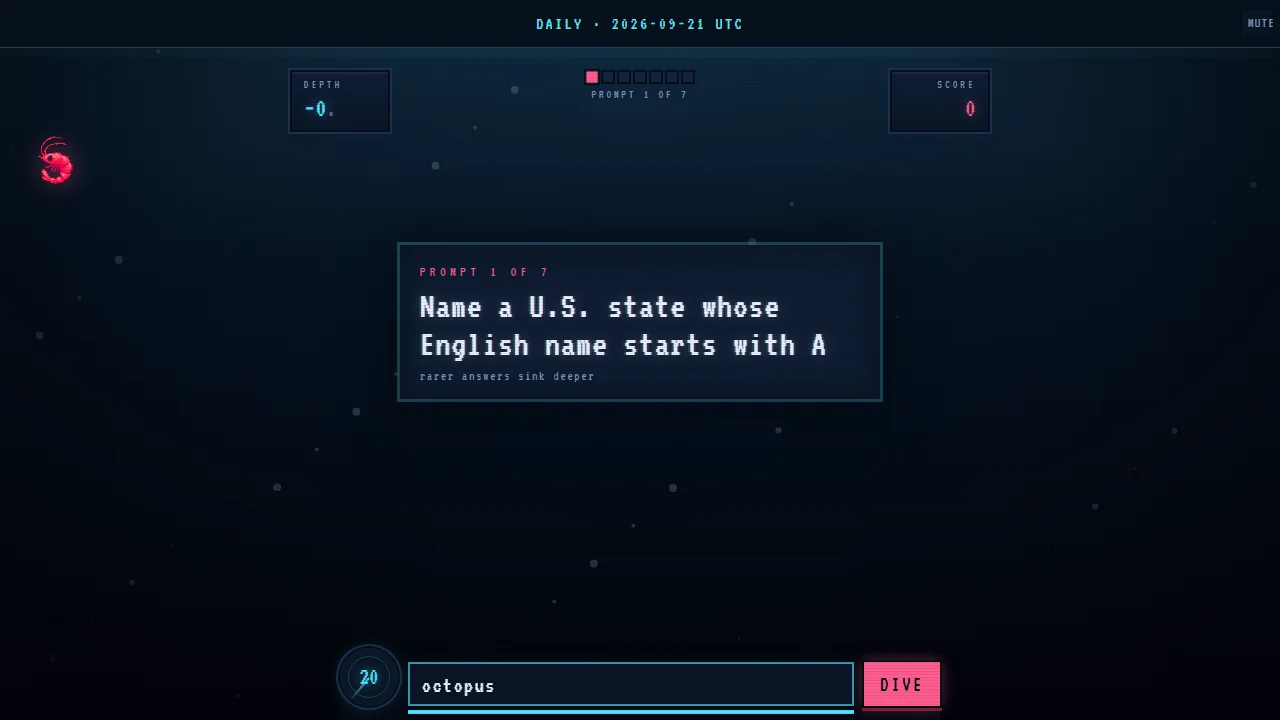
A live prompt can be fully visible while keyboard input goes to the browser page instead of the embedded game. Click or tap directly inside the answer field, type one harmless character, and verify that it appears. Do not use browser shortcuts as a focus test: pressing the space bar outside the field may scroll the page and look like the game ignored us.
Use a three-signal focus test
- The caret or active field styling appears where the answer belongs.
- A typed character appears inside that field, not in browser search or nowhere at all.
- Backspace removes the character from the same field.
If those signals fail, tap the centre of the field rather than its border, then try again. Exit browser fullscreen if a floating browser control is stealing the first tap. On a hardware keyboard connected to a tablet, confirm the keyboard layout before the run; switching languages mid-prompt can change punctuation and proper-name spelling. If input works after a direct click, there is no need to reload.
| Symptom | Likely cause | Minimal fix |
|---|---|---|
| Page scrolls when space is pressed | Focus is on the page | Click the answer field |
| Caret appears but letters do not | Input method or browser issue | Switch to a standard keyboard layout and retry once |
| Letters appear in browser search | Address/search UI has focus | Dismiss it and click inside the game |
| Typing works, Dive does not | Submission action or expired timer | Check whether time remains, then tap Dive directly |
Fix mobile keyboard, autocorrect, and covered Krillion controls
On a phone, the keyboard changes the viewport after it opens. The prompt may move upward, the Dive button may sit close to the keyboard edge, and browser chrome may consume the last usable strip of the screen. Settle portrait or landscape before Begin Descent, then tap the field and confirm that the prompt, remaining time, typed answer, and submit control can all still be reached.
| Mobile problem | Why it happens | Practical response |
|---|---|---|
| Keyboard covers Dive | Reduced visual viewport | Use Webpage Fullscreen or scroll only enough to expose the control |
| Proper noun changes after typing | Autocorrect replaces uncommon text | Review the final field value before submitting |
| First tap only wakes the player | Iframe did not yet own focus | Tap the answer field a second time before typing |
| Rotation hides the keyboard | Orientation rebuilt the viewport | Choose orientation before the timer, then refocus |
| Double tap zooms instead of selecting | Browser gesture interpretation | Use one deliberate tap in the centre of the input |
We found portrait easier for reading on narrow phones and landscape useful only when the keyboard still leaves enough vertical room. Device keyboards vary, so there is no universal winner. The success test is functional: all four live elements—prompt, timer, field, and Dive control—remain usable without pinch-zooming during the 25 seconds.
Krillion answer rejection versus a technical failure
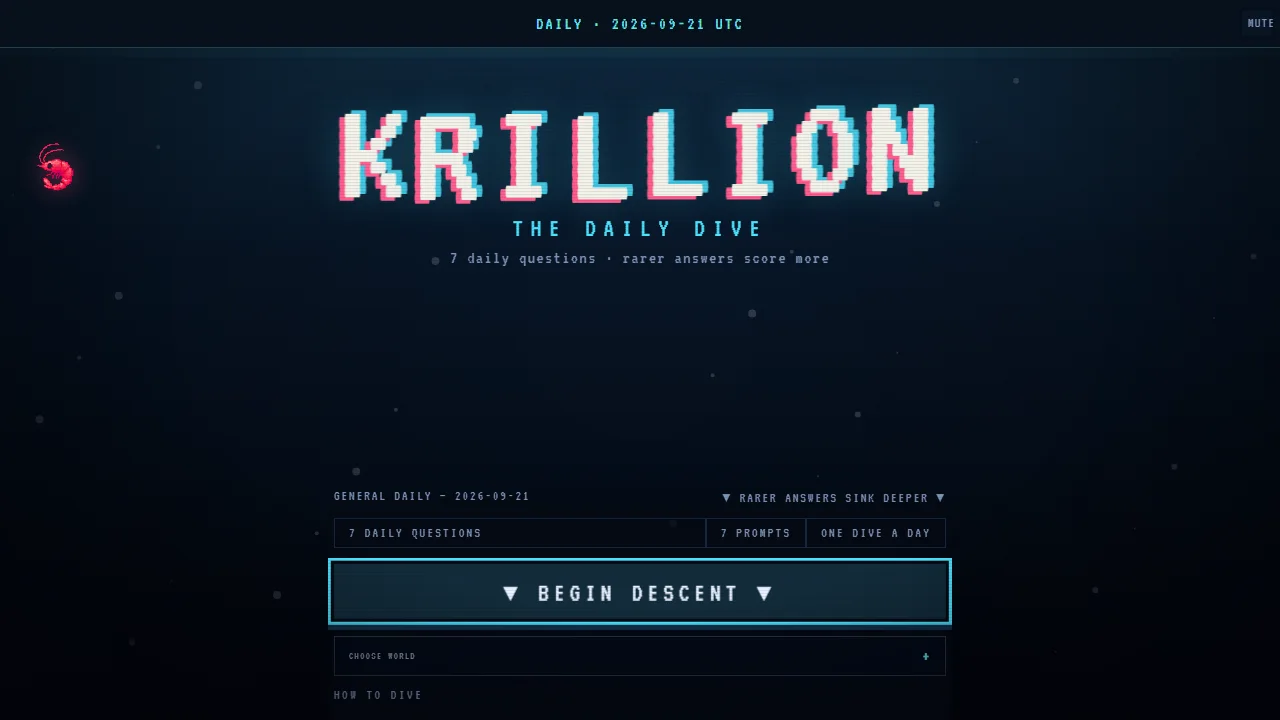
The message that an answer is not on the answer list is evidence that several technical layers worked. The keyboard entered text, the submit action reached the game, the connection stayed active, and the validator returned a response. Treat it as gameplay unless the message itself is stuck across new prompts or the interface stops responding afterward.
Triage rejection in the right order
- Check the category noun: person, place, animal, product, title, team, or another exact type.
- Check every qualifier, including letters, dates, speed thresholds, franchise, and current or former status.
- Check the standard spelling and conventional name.
- If all three look sound, switch to the safe backup while time remains; answer-list coverage can still differ from general knowledge.
- Only investigate a technical fault when controls, timer, or prompt progression also stop behaving normally.
Do not weaken browser security to make a disputed answer count. A category mismatch and an answer-list omission are content issues, not permission issues. The fastest recovery inside the run is a second clearly valid answer. After the run, note the exact prompt and response if the same recognised name is consistently rejected.
Fix fullscreen, zoom, orientation, and cropped controls
Display problems are safest to solve before the timer. If controls are cropped, exit fullscreen first, return browser zoom to its normal level, and let the page reflow. Then choose Webpage Fullscreen if a larger player is still needed. Browser Fullscreen and Webpage Fullscreen solve different problems: one removes browser chrome, while the other enlarges the game region inside the site.
| Display symptom | Reset sequence |
|---|---|
| Bottom controls missing | Exit fullscreen → reset zoom → scroll the page to the full player → re-enter one fullscreen mode |
| Text is too small | Use Krillion's display option or supported page view before increasing browser zoom dramatically |
| Player wider than the phone | Return to portrait, reset pinch zoom, then reload only if no run is active |
| Keyboard pushes prompt away | Close keyboard, choose the stable orientation, reopen field, and avoid rotating again |
| Easy Read or display menu covers content | Close the menu after choosing the option; verify the timer area is visible |
At 1024-pixel tablet widths, the page keeps a two-column information layout around the game; at 768 pixels and below it stacks the content. That surrounding layout does not change the game’s internal rules. If the iframe itself is clipped, focus on zoom and orientation rather than the page order.
Check blockers and networks without weakening browser safety
Embedded games depend on scripts, frames, storage, and requests to their own host. A strict blocker, filtered DNS service, managed school or office network, or privacy profile can stop one of those pieces while leaving this guide readable. Test narrowly. A temporary comparison in a clean browser profile or another trusted network is safer and more informative than disabling every extension or protection globally.
Make one controlled comparison
| Comparison | What a different result tells us | What it does not prove |
|---|---|---|
| Normal profile vs clean profile | An extension or stored site state may be involved | Which exact extension is responsible |
| Wi-Fi vs mobile data | The network path or policy differs | That the game is permanently blocked |
| Current browser vs another updated browser | A browser-specific setting or compatibility issue | That security features should be disabled everywhere |
| Now vs later | A host outage may have recovered | That the original device was faulty |
Never bypass a browser security warning or install unknown software to play. Krillion runs in the browser; it does not need an executable, extension, or certificate exception. If a managed network blocks the host, respect that policy or use an authorised network. If the host is down, waiting is the correct fix.
Krillion Loading and Input FAQ
Final checklist before declaring the player unavailable
- Play Now was pressed once and the loading state was allowed to finish.
- Retry was used once after a clear failure or timeout.
- The same URL was compared in a clean, updated browser context.
- A second trusted network was tested when practical.
- A visible answer rejection was not mistaken for a load failure.
- No global security setting, certificate warning, or unknown download was accepted.
Why is there no iframe before I press Play Now?
That is intentional. The launcher delays the external connection until you ask to play, improving the initial page load and avoiding an unnecessary third-party request.
Why can I see the Krillion prompt but not type?
The iframe or answer field probably lacks focus. Tap directly inside the field and verify that a character appears before changing any browser setting.
Does 'not on this answer list' mean Krillion is broken?
Usually no. It proves submission reached the validator. Recheck the category, qualifiers, canonical spelling, and use another valid answer while the timer runs.
Should I clear all cookies and browser data?
Not as a first step. Compare a clean profile first. If site data is clearly involved, remove only the affected site's data after the current run is no longer recoverable.
Why does the mobile keyboard hide the Dive button?
The keyboard reduces the usable viewport. Choose a stable orientation before starting and use Webpage Fullscreen or a small scroll so the prompt, field, timer, and button remain reachable.
Can I disable every blocker to make Krillion load?
Do not disable protection globally. Test a clean profile or a narrow site-specific exception only if you trust the site, and restore the setting when it does not help.
What if Krillion fails in every browser and network?
The external host may be unavailable. Stop the refresh loop and return later; the written guides and other pages can remain usable meanwhile.